
Gradio Authentication
Gradio is a Python library that enables developers to rapidly create intuitive web interfaces for machine learning models and data science workflows with minimal code. It offers a simple and intuitive way to create user-friendly demos and applications, allowing users to interact with and test models directly in a web browser without requiring any front-end development knowledge.
That being said, out-of-the-box authentication options with Gradio are limited. That's where PropelAuth comes in. This guide will cover how to build and deploy a Gradio app using PropelAuth for authentication. We'll be using PropelAuth's OAuth2 support alongside Gradio's OAuth support with external providers.
Setup in PropelAuth
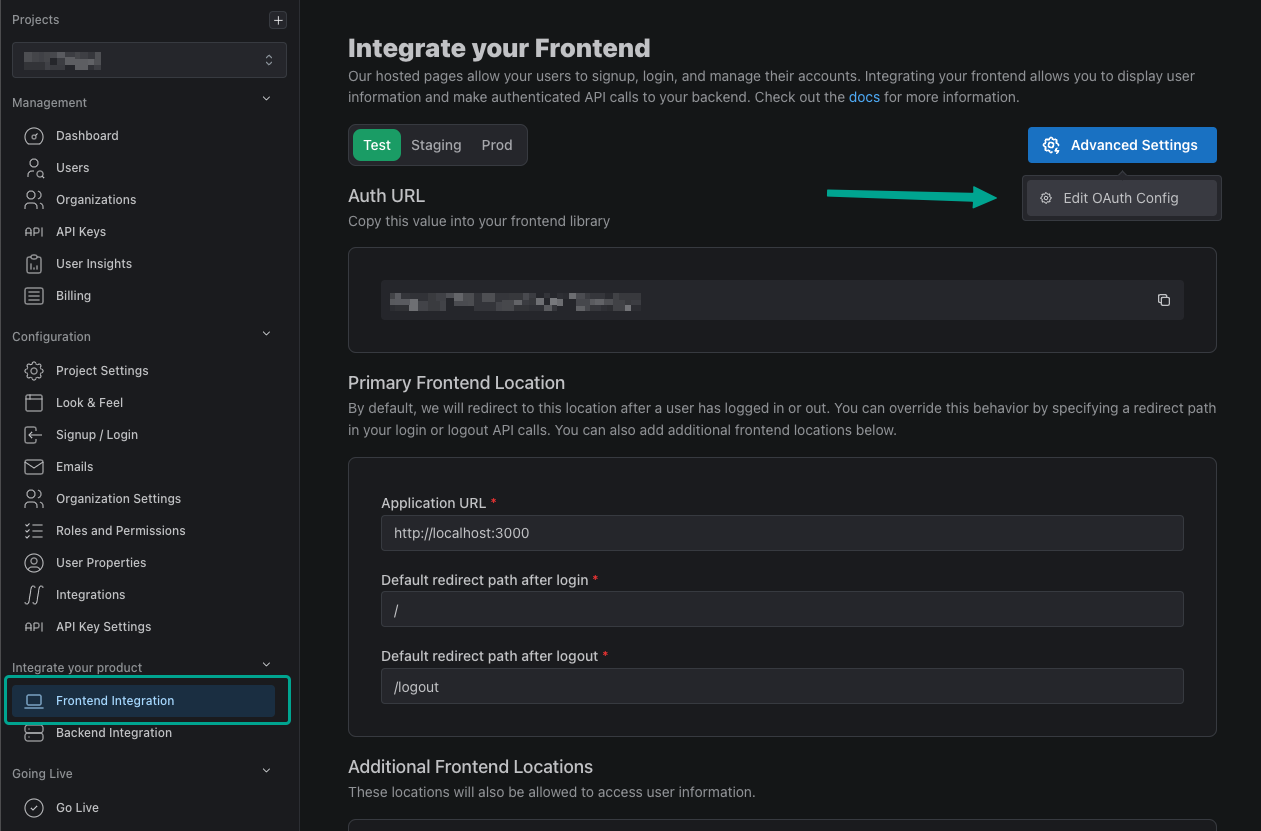
We first need to create an OAuth2 provider within PropelAuth. To do so, navigate to the Frontend Integration page in your PropelAuth dashboard, click on Advanced Settings then Edit OAuth Config.
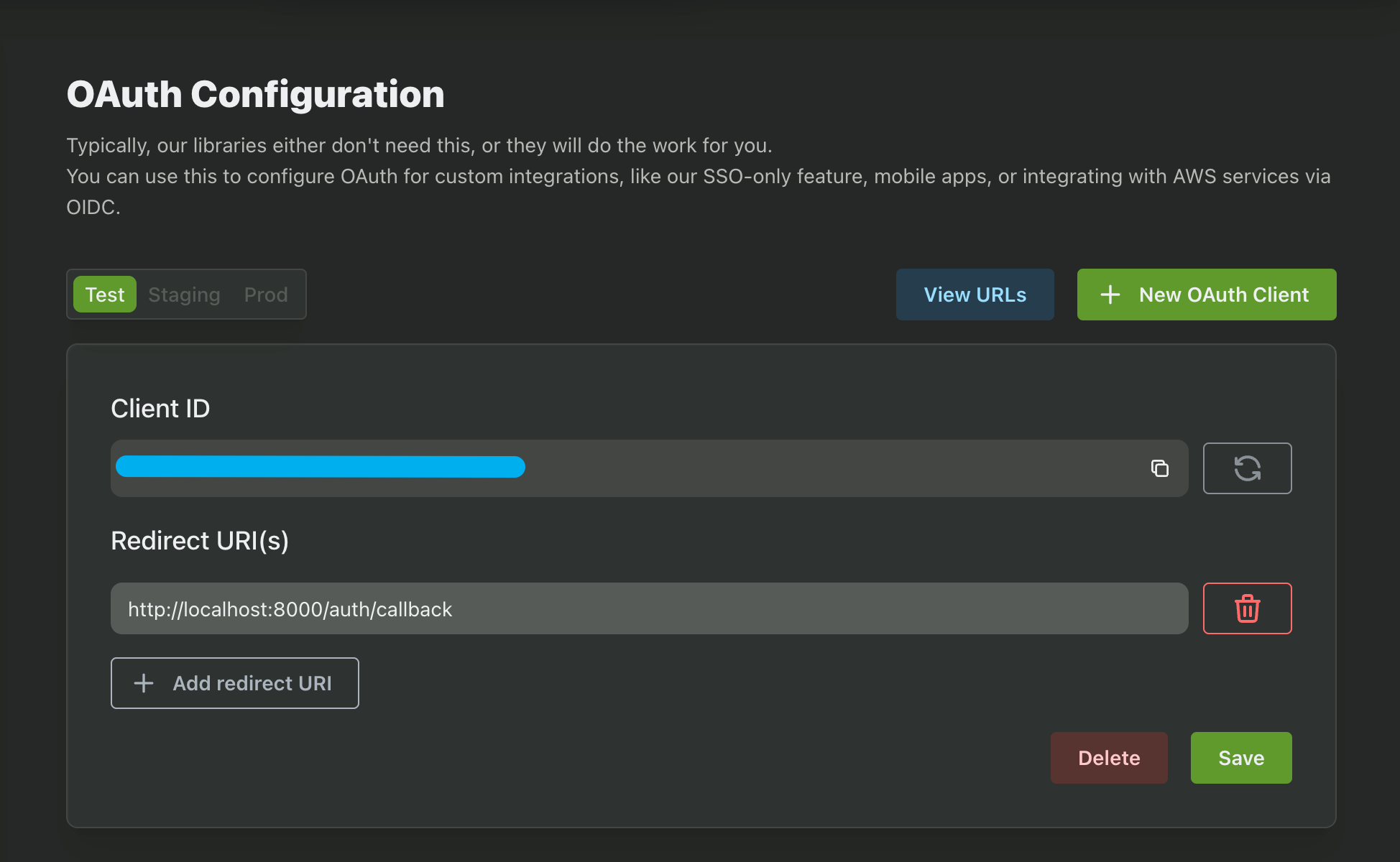
Create a New OAuth Client and copy down your Client ID and Client Secret. We'll be needing these for later.
While we're here, let's also add a Redirect URI. In this guide we'll be using http://localhost:8000/auth/callback.
The last variable we need is our Auth URL. You can find this back in the Frontend Integration page.
Installation
In your Gradio project, install the propelauth-py library:
pip install propelauth_py
Now create a new file in your root directory and name it propelauth.py. Copy the following code into it, making sure to edit YOUR_AUTH_URL and YOUR_API_KEY with the values found in your Backend Integration page in PropelAuth. You likely want to load them as environment variables instead of hardcoding them.
propelauth.py
from propelauth_py import init_base_auth, UnauthorizedException, User
from fastapi import Request, Response
import gradio as gr

# Replace me
AUTH_URL = "{YOUR_AUTH_URL}"
API_KEY = "{YOUR_API_KEY}"

class Auth:
    def __init__(self, auth_url, integration_api_key):
        self.auth = init_base_auth(auth_url, integration_api_key)
        self.auth_url = auth_url
        self.integration_api_key = integration_api_key
        self.js_logout = """
        () => {
            const requestOptions = {
                method: "POST",
            };
            fetch("/auth/logout", requestOptions)
                .then(response => response.text())
                .then(() => window.location.href = "/")
        }
        """

    def get_user_from_access_token(self, user, request: Request):
        try:
            if request.session.get('access_token') is None:
                return self.force_refresh_user(user, request)
            return self.auth.validate_access_token_and_get_user(f"Bearer {request.session['access_token']}")
        except UnauthorizedException:
            return self.force_refresh_user(user, request)

    def force_refresh_user(self, user_id, request):
        access_token_response = self.auth.create_access_token(user_id, 10)
        request.session['access_token'] = access_token_response.access_token
        return self.auth.validate_access_token_and_get_user(f"Bearer {request.session['access_token']}")

    def get_account_url(self):
        return self.auth_url + "/account"

    def log_out(self, request: Request):
        if request.session:
            user = request.session.get('user')
            if user is not None:
                self.auth.logout_all_user_sessions(user['sub'])
            request.session.clear()
        return Response()

    def get_user_dependency(self, request: Request):
        user = request.session.get('user')
        if user:
            propelauth_user = self.get_user_from_access_token(user['sub'], request)
            request.state.user = propelauth_user
            return user['sub']
        return None

    def get_user(self, request: gr.Request) -> User:
        return request.state.user

auth = Auth(
    AUTH_URL,
    API_KEY
)
This is a helper class which will help retrieve the user's information, redirect to the user's hosted account page, and log the user out. We'll cover some of these functions in this guide, but feel free to use these functions or add more yourself!
Configuration
To authenticate with PropelAuth in your Gradio app, you must mount your app within a FastAPI app. This will allow us to create routes with FastAPI to handle the authentication process.
In your Gradio app's main file, use the Auth URL, Client ID, and Client Secret that we retrieved in the previous step. You likely want to load them as environment variables instead of hardcoding them. You'll also need to create a SECRET_KEY which is a randomly generated string.
We'll be using Starlette's SessionMiddleware to handle the user's session. In the next step, we'll add some custom middleware to automatically redirect the user to login if they're not authenticated.
app.py
from authlib.integrations.starlette_client import OAuth
from fastapi import FastAPI
from starlette.config import Config
from starlette.middleware.sessions import SessionMiddleware

PROPELAUTH_CLIENT_ID = "{YOUR_CLIENT_ID}"
PROPELAUTH_CLIENT_SECRET = "{YOUR_CLIENT_SECRET}"
PROPELAUTH_AUTH_URL = "{YOUR_AUTH_URL}"
SECRET_KEY = "{RANDOMLY_GENERATED_STRING}"

config_data = {
    'PROPELAUTH_CLIENT_ID': PROPELAUTH_CLIENT_ID,
    'PROPELAUTH_CLIENT_SECRET': PROPELAUTH_CLIENT_SECRET
}
starlette_config = Config(environ=config_data)
oauth = OAuth(starlette_config)
oauth.register(
    name='propelauth',
    server_metadata_url=f'{PROPELAUTH_AUTH_URL}/.well-known/openid-configuration',
    client_kwargs={'scope': 'openid email profile'},
)

app = FastAPI()
app.add_middleware(SessionMiddleware, secret_key=SECRET_KEY, https_only=True)
Next, let's add some routes that will handle the login and logout process. We'll also create some middleware that will automatically redirect the user to login if SessionMiddleware returns a 401.
app.py
from authlib.integrations.starlette_client import OAuth, OAuthError
from fastapi import FastAPI, Request
from starlette.responses import RedirectResponse
from propelauth import auth

@app.middleware("http")
async def postprocess_middleware(request, call_next):
    response = await call_next(request)
    if response.status_code == 401:
        return RedirectResponse("/auth/login")
    else:
        return response

@app.route('/auth/login')
async def handle_login(request: Request):
    redirect_uri = request.url_for('callback')
    if oauth.propelauth:
        # redirects user to login via PropelAuth
        return await oauth.propelauth.authorize_redirect(request, redirect_uri)
    else:
        return "Authentication not configured"

# The Redirect URI we set in PropelAuth
@app.route('/auth/callback')
async def callback(request: Request):
    try:
        if oauth.propelauth:
            access_token = await oauth.propelauth.authorize_access_token(request)
        else:
            return None
    except OAuthError as e:
        return f"An OAuth error has occurred during callback: {e}"
    request.session['user'] = dict(access_token)["userinfo"]
    return RedirectResponse(url='/')

@app.route('/auth/logout', methods=["POST"])
async def logout(request: Request):
    return auth.log_out(request)
And we're all setup! If you were to navigate to your application you will be automatically be redirected to login. Your app is now protected by PropelAuth!
Displaying User information
Getting the logged in user's information couldn't be simpler. Add the get_user_dependency function from our propelauth.py file as the auth_dependency when mounting the Gradio app. Then, simply pass the Gradio Request into the get_user function and that's it! If the user is logged in, we'll get back a User object.
import gradio as gr
from propelauth import auth

def welcome(request: gr.Request):
    user = auth.get_user(request)
    return f"Welcome to Gradio, {user.email}!"

with gr.Blocks() as main:
    m = gr.Markdown("")
    main.load(welcome, None, m)

app = gr.mount_gradio_app(app, main, path="", auth_dependency=auth.get_user_dependency)
Authorization / organizations
You can also verify which organizations the user is in, and which roles and permissions they have in each organization using the User object.
Check Org Membership
Verify that the user is logged in and that the user is a member of the specified organization.
def get_user_orgs(request: gr.Request):
    propelauth_user = auth.get_user(request)
    orgs = propelauth_user.get_orgs()
    org_choices = [(org.org_name, org.org_id) for org in orgs]
    org_dropdown = gr.Dropdown(label="Select Organization", choices=org_choices, value=org_choices[0][1] if org_choices else None, interactive=True)
    return org_dropdown

def check_membership(org_id, request: gr.Request):
    propelauth_user = auth.get_user(request)
    org = propelauth_user.get_org(org_id)
    if org:
        return f"You are in org {org.org_name}"
    else:
        return "You do not belong to this org."

with gr.Blocks() as main:
    org_dropdown = gr.Dropdown(label="Select Organization", choices=[], interactive=True)
    org_info = gr.Markdown("")
    org_dropdown.change(fn=check_membership, inputs=[org_dropdown], outputs=org_info)
    main.load(get_user_orgs, None, [org_dropdown])

app = gr.mount_gradio_app(app, main, path="", auth_dependency=auth.get_user_dependency)
Check Org Membership and Role
Similar to checking org membership, but will also verify that the user has a specific Role in the organization. This can be done using either the User or OrgMemberInfo objects.
A user has a Role within an organization. By default, the available roles are Owner, Admin, or Member, but these can be configured. These roles are also hierarchical, so Owner > Admin > Member.
def get_user_orgs(request: gr.Request):
    propelauth_user = auth.get_user(request)
    orgs = propelauth_user.get_orgs()
    org_choices = [(org.org_name, org.org_id) for org in orgs]
    org_dropdown = gr.Dropdown(label="Select Organization", choices=org_choices, value=org_choices[0][1] if org_choices else None, interactive=True)
    return org_dropdown

def check_role(org_id, request: gr.Request):
    propelauth_user = auth.get_user(request)
    org = propelauth_user.get_org(org_id)
    role_to_check = "Admin"
    if org and org.user_is_role(role_to_check):
        return f"You are an Admin in org {org.org_name}"
    else:
        return "You must be an Admin to access this page."

with gr.Blocks() as main:
    org_dropdown = gr.Dropdown(label="Select Organization", choices=[], interactive=True)
    org_info = gr.Markdown("")
    org_dropdown.change(fn=check_role, inputs=[org_dropdown], outputs=org_info)
    main.load(get_user_orgs, None, [org_dropdown])

app = gr.mount_gradio_app(app, main, path="", auth_dependency=auth.get_user_dependency)
Check Org Membership and Permission
Similar to checking org membership, but will also verify that the user has the specified permission in the organization. This can be done using either the User or OrgMemberInfo objects.
Permissions are arbitrary strings associated with a role. For example, can_view_billing, ProductA::CanCreate, and ReadOnly are all valid permissions. You can create these permissions in the PropelAuth dashboard.
def get_user_orgs(request: gr.Request):
    propelauth_user = auth.get_user(request)
    orgs = propelauth_user.get_orgs()
    org_choices = [(org.org_name, org.org_id) for org in orgs]
    org_dropdown = gr.Dropdown(label="Select Organization", choices=org_choices, value=org_choices[0][1] if org_choices else None, interactive=True)
    return org_dropdown

def check_permission(org_id, request: gr.Request):
    propelauth_user = auth.get_user(request)
    org = propelauth_user.get_org(org_id)
    permission_to_check = "can_view_billing"
    if org and org.user_has_permission(permission_to_check):
        return f"You can view billing information for org {org.org_name}"
    else:
        return "You do not have the necessary permission to view billing information."

with gr.Blocks() as main:
    org_dropdown = gr.Dropdown(label="Select Organization", choices=[], interactive=True)
    org_info = gr.Markdown("")
    org_dropdown.change(fn=check_permission, inputs=[org_dropdown], outputs=org_info)
    main.load(get_user_orgs, None, [org_dropdown])

app = gr.mount_gradio_app(app, main, path="", auth_dependency=auth.get_user_dependency)
Calling Backend APIs
As you may have noticed, this guide uses PropelAuth's propelauth-py library to retrieve the user's information, among other things. This means you can use the propelauth-py library to make requests to PropelAuth's Backend API, allowing you to fetch members of an organization, create orgs, and a lot more.
from propelauth import auth

magic_link = auth.auth.create_magic_link(email="test@example.com")
Logging Out
To log a user out of your Gradio app we will use the js event parameter on a button to have the client make a request to the /auth/logout route that we created earlier. This will clear the user's session and log them out of your Gradio app. If you want to change where the user is redirected to after logging out, you can do so by changing the js_logout script in the propelauth.py file.
import gradio as gr

logout_button = gr.Button("Logout")
logout_button.click(None, None, None, js=auth.js_logout)
When clicked, the client will make a POST request to the /auth/logout route where they will be logged out of your Gradio app as well as PropelAuth's hosted pages.
Logging Out Through The Hosted Pages
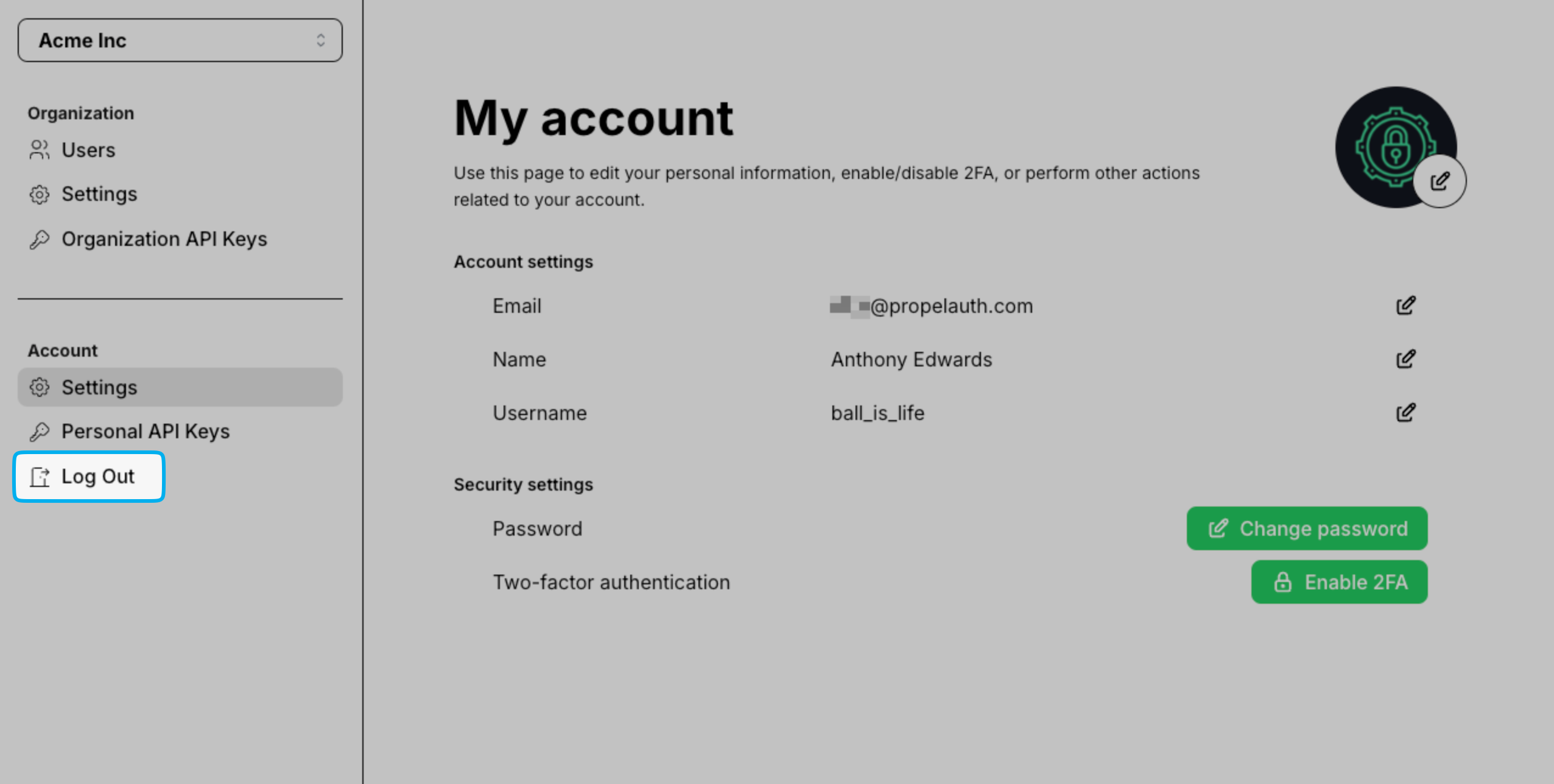
If you're using PropelAuth's hosted pages you may find that the Log Out button found in the Account Page Sidebar does not completely log the user out of their Gradio session.
Removing the Log Out Button
There are a couple of ways to address this. First, you can remove the Sidebar by navigating to the Look & Feel section of your PropelAuth Dashboard, clicking Open Editor followed by Management Pages towards the top.
Find the Display Sidebar setting and disable it.
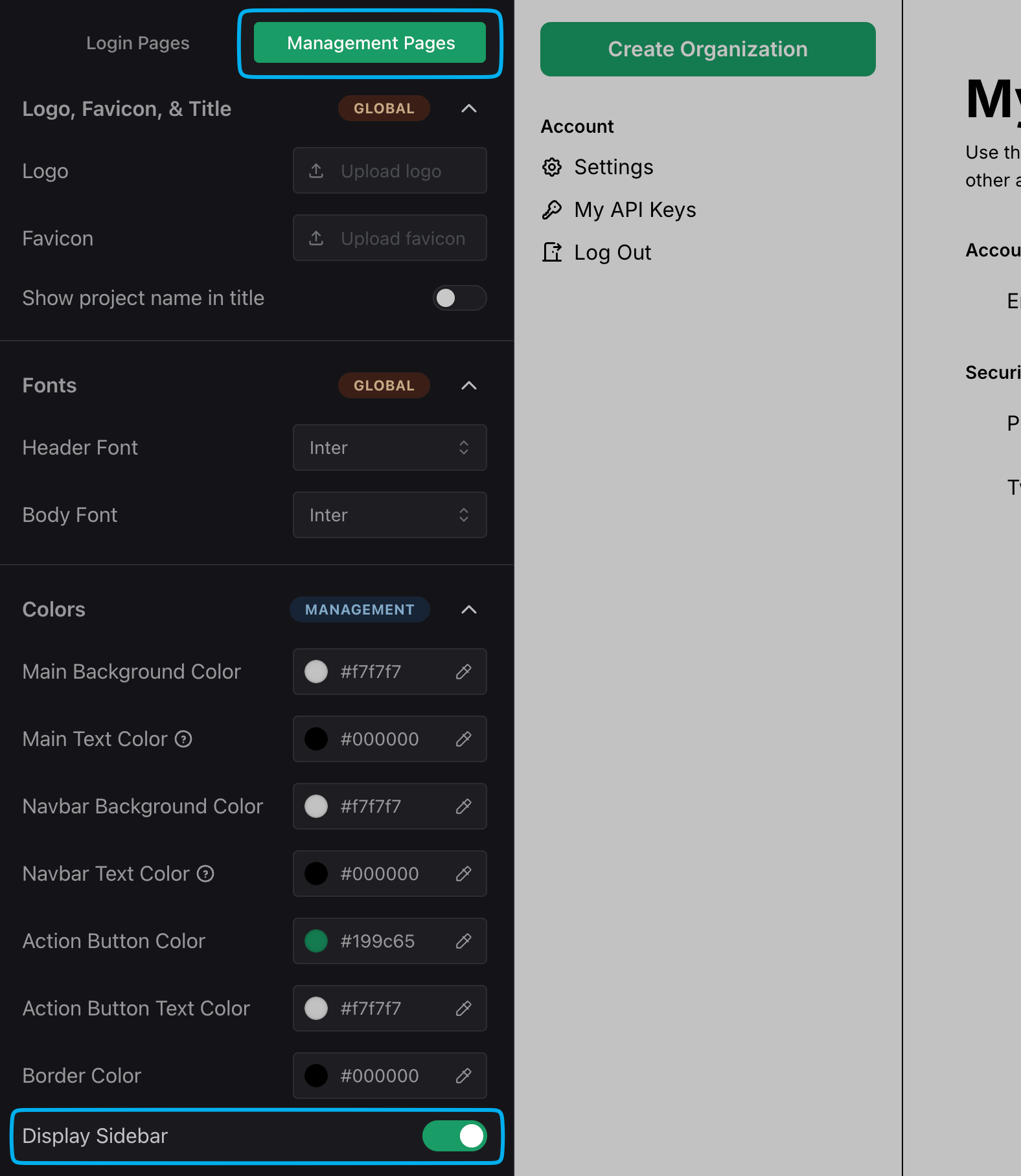
The Sidebar as well as the Logout button are now removed from the hosted pages.
Have any questions? Please reach out to support@propelauth.com.